Vague Searches Give You Vague Data
Most catalogs have holes. A product with no description. A listing with one bad photo. An attribute field that's been empty since the item was imported three years ago.
The holes cost you twice: once when a shopper bounces because they can't tell what they're buying, and again when the order comes back because it wasn't what they expected.
Dyver fills those holes by searching for the missing information and writing it into your catalog. But the quality of what comes back depends almost entirely on how you set up the search. Here's how to set it up well.
The narrower the search, the better the result
Broad internet search is the weakest option, not the strongest. It works fine for a popular consumer product sold by five hundred stores. It falls apart for a niche industrial part sold by two.
So work from narrow to broad:
Best: extract from a URL. If you have the supplier's product page link for each item, use the Extract from URL step. Dyver reads the page and pulls what it needs. If the manufacturer's site follows a consistent URL pattern, Dyver can often build those links for you. Nothing beats this for reliability.
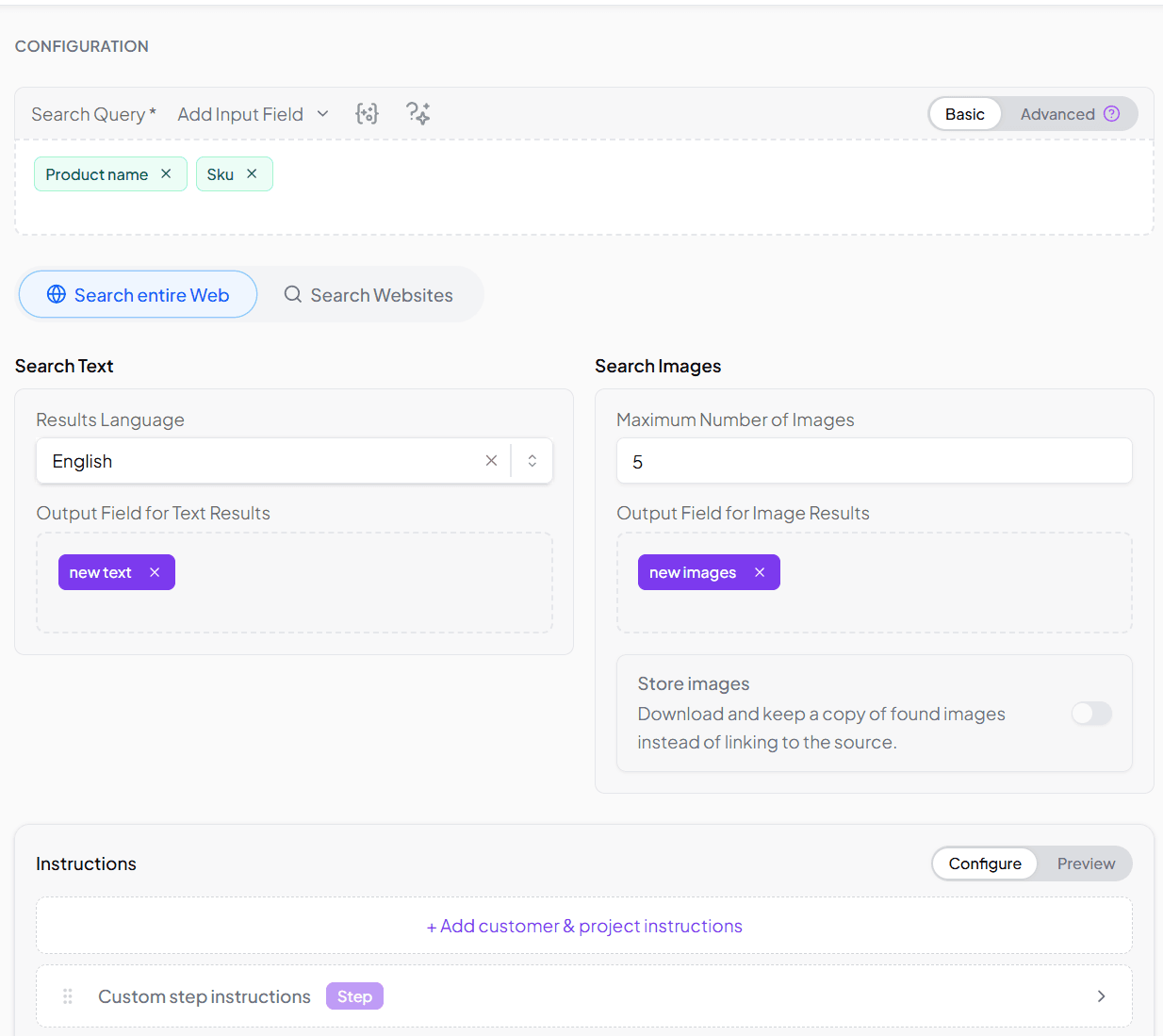
Next best: search within known sites. No individual product URLs, but you know the brand or manufacturer's domain? Use Find Product Data and restrict the search to those sites.
Last resort: generic internet search. Available in the same step, and genuinely useful for mass-market goods. Just don't expect it to find the torque rating on a specialist fitting.
Trusted sources matter more in B2B
Consumer products get described accurately in a hundred places. B2B and long-tail products don't. Specifications get copied, mangled, and re-copied across aggregator sites until the number in front of you is nothing like the one on the manufacturer's datasheet.
If you're enriching parts, components, or anything technical, limit the search to sources you actually trust: the manufacturer, the brand, a handful of authoritative industry sites. A smaller set of good sources beats a large set of mixed ones every time.
Your search parameters decide everything
The second decision is what you search with.
If your products carry a unique identifier — an EAN, a GTIN, a manufacturer part number — start there, provided that identifier commonly appears on product pages in your industry. Brand-assigned codes work well too.
No unique ID? Combine what you have: product name plus brand, plus category, plus color. There is no universal formula. What works for apparel won't work for fasteners.
Test before you commit. Run your search setup against ten or twenty products, look at the results, then change one thing and run it again. Two or three rounds of this will tell you more than any amount of planning. Once you've found the combination that works, scale it to the full catalog.
Four ways to tighten the search in Dyver
Dyver gives you several controls for making a search more precise. Most people only use the first one.
Advanced query builder. When a plain field reference isn't enough, build a query that mixes static text with values from your product fields — something like [Brand] [MPN] technical datasheet. This is how you steer the search toward the kind of page you want, rather than just naming the product. If you're not sure how to structure it, describe what you're after and the AI Assistant will build the query for you.
Language selection. If you need results in a language other than your project's default, set it explicitly. A German catalog sourcing from an English-language manufacturer site is a common case, and one worth being deliberate about.
Additional instructions. Use this to tell the AI what you're actually looking for. "Prioritize the manufacturer's official specification sheet." "Ignore marketplace listings." "The dimensions should be in millimeters." These hints are cheap to write and change results noticeably.
Site-specific customization (enterprise). For enterprise customers, our support team can configure custom search plugins for specific sites. Two things this unlocks: Dyver can use the site's own built-in search interface instead of guessing at URLs, and we can encode what we know about how that site structures its product pages, so extraction lands on the right fields instead of scraping whatever's nearby. If a particular supplier site is central to your catalog, this is worth asking about. Password-protected sites can be handled this way too.
Always check what comes back
Whichever route you take, add a validation step. Dyver can run AI-based checks on the retrieved data, or route it to a human for review before it touches your live catalog. Enrichment at scale is only useful if you can trust it at scale.
Start small
Pick one product group. Try the narrowest search you can. Test on a handful of items. Adjust one parameter at a time until the results hold up. Then let it run.
The catalog holes have been there for years. They don't have to be there next quarter.